Quick overview: what Canva announced and why it matters
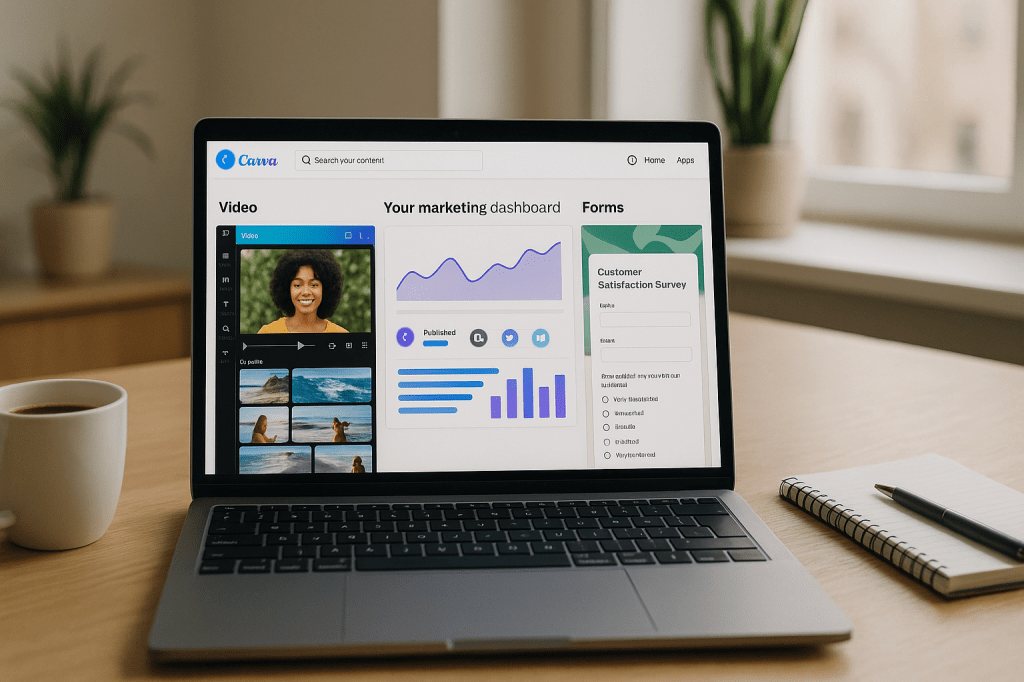
Canva announced a new suite of AI powered tools grouped under the label Creative Operating System. The rollout includes a redesigned video editor with templates and a simplified timeline, a Forms tool that feeds feedback into Canva Sheets, a Canva Grow marketing platform for designing and tracking campaigns, and an Email Design product for branded emails. Canva says these features run on a new in house design AI model, and many advanced capabilities will be available to paid subscribers.
The move is less about creating a new computer operating system and more about offering a unified marketing workspace. Canva aims to be a single place where design, video editing, campaign creation, feedback collection, and reporting live together, which could change how small businesses, marketers, and teams manage creative work.
What the Creative Operating System actually is
Canva’s Creative Operating System is a branded collection of products and workflows. It connects visual creation tools with marketing and campaign management features. The goal is to reduce the number of separate apps people use to make, approve, and publish content.
Key elements are:
- Design and video tools updated for simplicity and speed.
- Form and feedback collection that integrates with Canva Sheets.
- Canva Grow, a platform to design, launch, and monitor AI optimized campaigns.
- Email Design for creating consistent branded emails that can be exported to mailing systems.
- An in house AI model tailored to design tasks, powering many features.
Major product updates explained
Redesigned video editor
Canva simplified its video editor to make basic editing easier for non experts. The update adds templates and a more approachable timeline, which should cut the learning curve for short marketing videos and social clips. If you need fast edits or short social videos, these changes matter because they reduce friction from idea to publish.
Forms and Canva Sheets integration
Canva’s new Forms tool captures feedback and responses and imports that data directly into Canva Sheets. That lets teams collect approvals, customer feedback, or simple survey responses without leaving Canva. For teams that already use Canva for assets, this can remove a step in approval workflows.
Canva Grow marketing platform
Canva Grow is a more marketing focused part of the suite. It helps users design campaigns, schedule assets, and track performance. The platform uses AI to suggest optimizations based on performance data. This aims to let small teams run ad campaigns and measure results from within the same environment they use to create assets.
Email Design
Canva’s Email Design product helps users create branded email templates and export them for sending. For small businesses that juggle separate design and email tools, built in email design can make it easier to keep visual identity consistent across channels.
In house design AI model
All of these features are supported by a new AI model developed by Canva for design tasks. The model focuses on layout, styling, and content suggestions. Canva emphasizes that advanced capabilities are often part of its paid tiers, which means some features will be gated.
Who is affected
This update targets several groups:
- Small businesses and solo entrepreneurs who want an all in one tool for design and simple marketing.
- Marketing teams that need quicker production and centralised campaign tracking.
- Content creators who want easier video editing without learning professional software.
- Design agencies and freelancers who may use Canva for rapid mockups and client approvals.
Potential benefits for everyday users
- Faster workflows, since creation, feedback, and campaign tracking can happen in one place.
- Lower barriers to basic video editing, which helps small teams produce more video content.
- Consistent branding across channels thanks to integrated email and asset management.
- AI assistance that suggests layouts and campaign improvements, saving time on routine tasks.
Questions and concerns to consider
There are trade offs to any all in one service. Canva’s new offering raises a few practical issues for users to weigh.
- Pricing and feature access, many advanced tools are in premium plans. That could raise costs for teams that need the full workflow.
- Vendor lock in, moving design, feedback, and campaign tracking into one platform can make switching away harder over time.
- Feature depth, specialised tools often offer deeper functionality than generalist suites, so power users may still need dedicated apps.
- Data and export options, check how easy it is to export assets and campaign data if you want to move to another tool later.
How this fits into the broader app market
Canva is positioning itself as an alternative to parts of Google and Microsoft workplace applications, by offering integrated creative and marketing workflows. The company is pushing toward an end to end experience where design meets distribution and analytics. For many small teams, that simplification is attractive because it reduces the number of tools they must manage.
At the same time, the move raises questions about bundling and customer choice. If more advanced capabilities live behind subscription tiers, organisations will need to evaluate cost against value and check whether the platform supports their export and privacy needs.
Practical tips for marketers and small businesses
- Try free features first to see whether the simplified video editor and Forms solve your core needs.
- Compare premium pricing with the cost of your current toolset, including licences for video editors and email platforms.
- Check export formats and data portability policies so your assets and performance data remain accessible if you change vendors.
- Use the integrated workflows for drafts and quick campaigns, but keep backups and source files in case you need more advanced editing later.
- Watch how the AI suggestions work on your content. AI can speed simple tasks, but manual oversight is still important for brand voice and accuracy.
Key takeaways
- Canva’s Creative Operating System is a branded suite that merges design, video editing, feedback collection, marketing campaign creation, and email design into one workspace.
- The suite is powered by an in house AI model tailored for design tasks. Many advanced features are available only to paid subscribers.
- For many small teams and creators, integration may speed work and reduce tool overhead. For others, specialised apps may still be necessary.
- Decide based on costs, export options, and whether the simplified tools meet your needs before fully moving your workflow into Canva.
FAQ
Is Canva creating a new operating system for computers?
No. The Creative Operating System is a marketing label for a set of integrated web based and app based tools. It is not a computer operating system in the traditional sense.
Will the new features be free?
Some features will be available in free tiers. Canva has stated that many advanced capabilities will be reserved for premium subscribers. Users should check Canva’s pricing and feature lists to see which tools match their needs.
Can I export data and assets if I decide to leave?
Canva allows exports of many asset types, but you should verify export formats for specific assets and campaign reports before committing important workflows to the platform. Confirm data portability for Sheets and campaign analytics if that matters for your operations.
Do I need to trust Canva’s AI with my content?
The AI is used to suggest designs and campaign optimizations. As with any AI assistance, it is best used under human review, especially for branding and legal compliance. Users should test the AI and edit outputs as needed.
Conclusion
Canva’s Creative Operating System packages design tools, simple video editing, form based feedback, marketing campaign management, and email design into a single branded workflow. For small businesses and teams that want fewer apps and faster production, this could be a meaningful efficiency gain. At the same time, the choice to gate advanced features behind paid plans and to centralise multiple workflows in one platform creates trade offs around cost and flexibility.
Evaluate the new tools against your current stack, test export options, and try the free features before changing your core workflows. If you value integrated simplicity, Canva’s approach may reduce friction. If you rely on deep feature sets or need strict portability, keep a careful eye on the details.






 AI Everything Today
Leave a comment